App makers · Involuntary churn
Should your iOS subscription app turn on a 3, 16 or 28-day billing grace period?
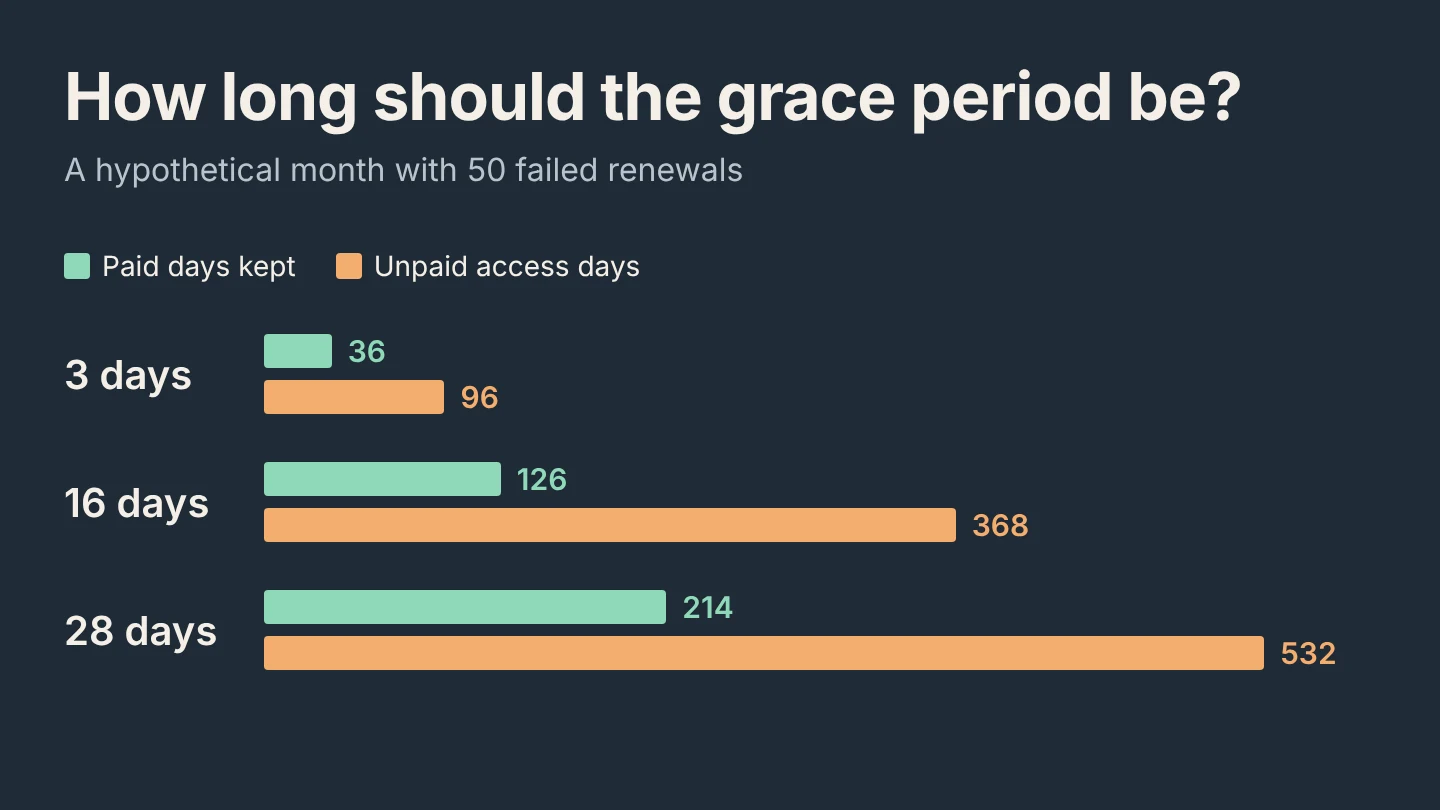
Count recovery days before choosing. In a hypothetical 50-failure month, 16 days keeps 126 paid days on the calendar and serves 368 unpaid access days. Your recovery timing and per-day cost decide whether that trade is worth it.
GimmeTheSauce editorial ·
Turn on a billing grace period when the subscribers you recover inside it are worth more than the access you give everyone else during it. Apple lets you choose 3, 16 or 28 days for monthly and longer plans. If Apple collects payment inside the window, the subscriber keeps their renewal date and you keep the revenue for those days. If Apple collects payment later, Apple says the grace-period service is not paid for. Apple’s Billing Grace Period setup guide
What changes when Apple recovers a payment
After a renewal fails for a billing reason, the App Store can retry for up to 60 days. Without a grace period, paid access pauses. A recovery on day 10 starts a new billing cycle on day 10, so the subscriber’s future renewals move ten days later. With a grace period that covers day 10, the subscriber keeps access and the original renewal date. Those ten days stay paid. Apple’s involuntary churn guide
The setting applies to every subscription in the app. Weekly plans get 3 or 6 days, even if you choose 16 or 28. Once a subscriber’s billing error starts, their assigned grace period cannot change. You also choose whether it covers all renewals or only paid-to-paid renewals. The first option includes a free introductory offer converting to its first charge.
Lay out one month of failed renewals
Suppose a hypothetical monthly plan has 50 billing failures in October. You recorded the day each payment was recovered:
| Recovery day | Subscribers |
|---|---|
| Day 2 | 18 |
| Day 10 | 9 |
| Day 22 | 4 |
| Day 45 | 3 |
| Never recovered | 16 |
Two numbers matter for each setting. Paid days kept is the sum of recovery days for subscribers recovered inside the window. Unpaid access days is the window length multiplied by everyone recovered later or never.
| Grace period | Recovered inside | Paid days kept | Unpaid access days |
|---|---|---|---|
| 3 days | 18 | 18 × 2 = 36 | 3 × 32 = 96 |
| 16 days | 27 | 36 + 9 × 10 = 126 | 16 × 23 = 368 |
| 28 days | 31 | 126 + 4 × 22 = 214 | 28 × 19 = 532 |
Moving from 3 to 16 days keeps 90 more paid days and adds 272 unpaid access days. Moving from 16 to 28 keeps 88 more and adds 164. The longer window looks better at the margin here only because four subscribers recover around day 22. Move them to day 30 and they fall outside every option.
Price the unpaid days
A paid day is worth roughly the plan price divided by its days. At a hypothetical $9.99 a month, 126 paid days is about $42 of future revenue. That holds only while these subscribers keep renewing; the gain comes from renewals no longer moving later. An unpaid access day costs whatever it costs you to serve one subscriber for a day.
For a habit tracker with almost no marginal cost, 368 unpaid days may cost close to nothing. Turning on 16 days is then easy to justify. For an AI app at a hypothetical $0.15 per active subscriber-day, the same 368 days cost $55.20. That exceeds the $42 the window protects. If usage cost is the issue, calculate your heavy users separately before choosing the window. You can also start with 3 days or limit coverage to paid-to-paid renewals.
This model deliberately holds recovery timing constant. A grace period can change behavior: people who lose access may update a card sooner, while uninterrupted access may delay them. You cannot split one app’s subscribers between settings. Compare cohorts by billing-failure date before and after the change, with the same plan mix and the same in-app billing message.
Get the recovery days from your server
Use App Store Server Notifications V2. A failed renewal sends DID_FAIL_TO_RENEW, with the GRACE_PERIOD subtype when grace applies. A recovery sends DID_RENEW with BILLING_RECOVERY. GRACE_PERIOD_EXPIRED marks the end of the window while retries continue, and EXPIRED with BILLING_RETRY marks the end of the retry period. Store the failure and outcome timestamps per original transaction. Apple’s notification types
Grant access from the renewal information’s gracePeriodExpiresDate, not from the expired transaction date alone. Apple asks you to provide full service throughout the window and to test entering and leaving it in sandbox before turning it on in production. If your dashboard shows trials ending without revenue, check whether some payments are still in retry before reading them as declined renewals.
Bring your recovery-day table and cost per subscriber-day to the Adapty Subscriptions Expert to choose a window to test ↗. Use counts and dates, not subscriber identifiers.